One Goal Sherpa

SMS Notifications & Opt-In Consent
Last updated: May 13, 2026
About This Page
This page publicly documents how end users of One Goal Sherpa opt in to SMS notifications, what consent they provide, and how they can opt out. It exists so that carriers and reviewers can verify our Call-to-Action (CTA) without needing to create an account.
Business & Campaign
- Business name: One Goal Sherpa (operated by OGAAT / One Goal at a Time)
- Website: onegoalsherpa.com
- Use case: Account notifications — a daily morning quote tied to the user’s active goal, plus a milestone confirmation message when they complete a goal.
- Message frequency: Up to 2 messages per day. The limit is enforced server-side, not just disclosed.
SMS Is Optional
SMS notifications are not required to create an account or use One Goal Sherpa. SMS is an optional add-on a user can:
- Opt in to during sign-up by entering a phone number and ticking a non-pre-selected consent checkbox on the signup form.
- Enable later from Settings → Text check-ins inside the app.
In both paths, a 6-digit verification code is sent to the phone number and the user must enter it correctly before any campaign messages are sent. Consenting to SMS is not a condition of account creation, purchase, or service use.
Step-by-Step Opt-In Flow (Sign-Up Path)
- A prospective user visits onegoalsherpa.com and opens the sign-up form.
- They enter their email (required) and password (required).
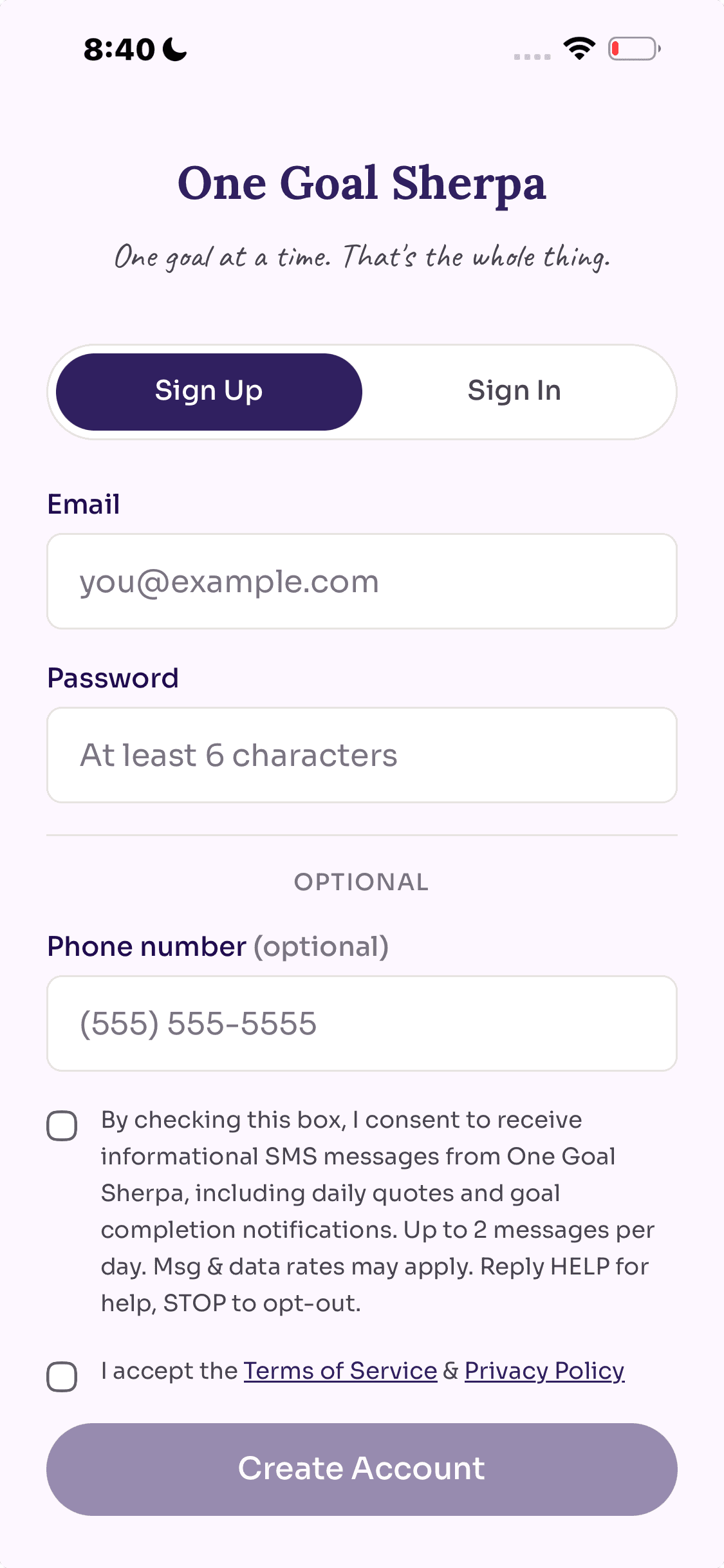
- Under an “Optional” divider, the form shows an optional phone number field and two checkboxes that are not pre-selected:
- An SMS consent checkbox with the exact language quoted below.
- A Terms & Privacy acceptance checkbox (required for any signup, with or without SMS).
- Clicking Sign Up creates the account regardless of whether SMS consent is checked. If the user did not tick the SMS consent box, no SMS data is stored and no verification code is sent.
- If the user did tick SMS consent and provided a phone number, after email confirmation they are routed to a verification screen. A 6-digit code is sent to the phone via SMS.
- The user enters the code. On success, the consent ledger row is written (with timestamp, IP address, user agent, and exact consent text version),
sms_enabledis set true, and a welcome confirmation SMS is sent. The user can also tap Skip for now on the verification screen, in which case the account is kept but no phone is stored.
Step-by-Step Opt-In Flow (In-App Path)
- A signed-in user navigates to Settings → Text check-ins.
- They tap Enable text check-ins, enter their phone number, and tap Send code.
- They receive a 6-digit code via SMS and enter it. On success, SMS is enabled and a welcome confirmation message is sent.
Screenshot of the Opt-In UI
The image below shows the signup form’s optional SMS section — the phone field and consent checkbox a user must explicitly tick to opt in. This is the canonical opt-in surface; the in-app Settings flow uses the same verification mechanism.
Exact Consent Language
The signup form’s SMS consent checkbox displays the following text verbatim. The checkbox is not pre-selected, and ticking it is not required to submit the form or create an account:
By checking this box, I consent to receive informational SMS messages from One Goal Sherpa, including daily quotes and goal completion notifications. Up to 2 messages per day. Msg & data rates may apply. Reply HELP for help, STOP to opt-out.
Each consent record is stored with a consent_text_version field so the exact wording presented at sign-up time can be reconstructed for any subscriber.
Opt-Out Instructions
Users can stop receiving SMS messages at any time by either of the following methods:
- Replying STOP to any SMS message received from One Goal Sherpa. A confirmation message will be sent, after which no further messages will be delivered.
- Signing in at onegoalsherpa.com, navigating to Settings → Text check-ins, and tapping Turn off.
For help, users can reply HELP to any message or email hello@onegoalsherpa.com.
Data Handling
Mobile numbers and SMS opt-in consent data are collected and stored solely to deliver the messages described above. Mobile numbers are never shared with third parties or affiliates for marketing or promotional purposes. Phone numbers entered but never verified are not retained. See Privacy Policy Section 5 (“Mobile Messaging”) and Section 6 (“SMS/Text Messaging”) for full details.
Full Legal References
- Privacy Policy — Section 6 covers SMS/Text Messaging terms in full.
- Terms of Service — Section 13 covers SMS Communications.
Contact
For questions about our SMS program, contact us at hello@onegoalsherpa.com.